
AppYourself Club AppYourself Club
  • NEWS
  • RESELLER CHECKLIST
  • SALES
  • SUPPORT
  • BLOG
  • NEWSLETTER
  • LIVE DEMO
  • MAKE A CALL: +49 30 – 60 98 19 795
  • Deutsch
  • English
AppYourself Club AppYourself Club
  • NEWS
  • RESELLER CHECKLIST
  • SALES
  • SUPPORT
  • BLOG
  • NEWSLETTER
  • LIVE DEMO
  • MAKE A CALL: +49 30 – 60 98 19 795
  • Deutsch
  • English
Sep 19

Product variations for the shop module

  • September 19, 2018
  • No Comments

The shop module: More variety for the products of your customers

Your customers can give their products different variants. These have an effect on the final price of the product. For example, they offer a pizza Hawaii in the sizes small, medium and large. Depending on which size is selected, the price of the pizza also changes.
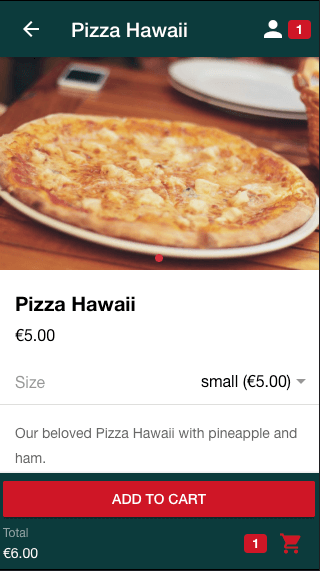
Product variations inside the shop of the app

The product variations are created as follows

The product variations are already active in the shop of your customers. In order to be able to use them, the entry Price must first be noted in the Shop module under Collection Design > Advanced options. Then your customers can call up the pizza under the tab Collection Items > Created Products. In the area Add Product, they can edit the pizza and add a list price and a description, for example. The list price of the pizza always remains unchanged. They will also see the product variations button on the right side. Your customers click on this button. Now they can give their pizza Hawaii further properties:
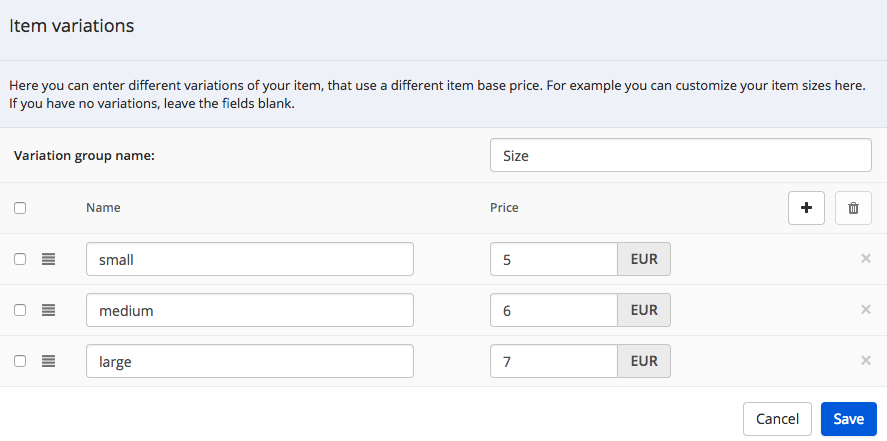
Setting up the product variations inside the dashboard

  • Variation group name (Size)
  • The names of the variations between which the app user can choose (small, medium, large)
  • The price of the variations (e.g. small: 5,00 €, medium: 6,00 €, large: 7,00 €)

The product variations must then be saved. As soon as your customers have finished processing all their products, they save it. It will now be displayed in the simulator on the right.

What is the difference to the product options?

Your customers can also define product options for their pizza (under Collection Design > Advanced options). However, compared to the product variations, these have no influence on the base price of the pizza.

Further information

  • The shop module: simply buy products via app
  • Addons equip products with additional extras
1462    App Maker  

Related Knowledge Base Posts -

  • How to assign an app to a customer
  • To get the Smart Widget with your WordPress website
  • What does it mean to publish an app in the dashboard?
  • Facebook
  • Twitter
  • Tumblr
  • Pinterest
  • Google+
  • LinkedIn
  • E-Mail

About The Author

Leave a reply Cancel reply

You must be logged in to post a comment.

Recent Posts

  • Selling apps: this is how you succeed as a reseller
  • Do my customers need an app?
  • Marketing tools: how to use them as an app reseller with promising results!
  • The new AppYourself brings great changes for your customers apps
  • Information on future App submissions to the Apple App Store

Recent Comments

    Archives

    • August 2021
    • November 2019
    • December 2018
    • May 2018
    • February 2018
    • January 2018
    • December 2017
    • November 2017
    • October 2017

    Categories

    • AppYourself
    • News
    • Product
    • Uncategorized

    Meta

    • Log in
    • Entries feed
    • Comments feed
    • WordPress.org
    2015 Theme - WordPress Theme built by Mintithemes using WordPress.
    • Search Knowledgebase