
AppYourself Club AppYourself Club
  • NEWS
  • RESELLER CHECKLIST
  • SALES
  • SUPPORT
  • BLOG
  • NEWSLETTER
  • LIVE DEMO
  • MAKE A CALL: +49 30 – 60 98 19 795
  • Deutsch
  • English
AppYourself Club AppYourself Club
  • NEWS
  • RESELLER CHECKLIST
  • SALES
  • SUPPORT
  • BLOG
  • NEWSLETTER
  • LIVE DEMO
  • MAKE A CALL: +49 30 – 60 98 19 795
  • Deutsch
  • English
Apr 18

How do I remove an app from the Google Play Store?

  • April 18, 2018
  • No Comments

You can remove an app from the Google Play Store at any time. It can no longer be found and is no longer available for download. To remove the app, please proceed as follows:

  1. Log in to the Google Play Console
  2. Select the app you want to remove
  3. Click on Store presence in the right-hand navigation bar
  4. Click on Pricing & distribution
  5. Under App Availability, click on the button Unpublish
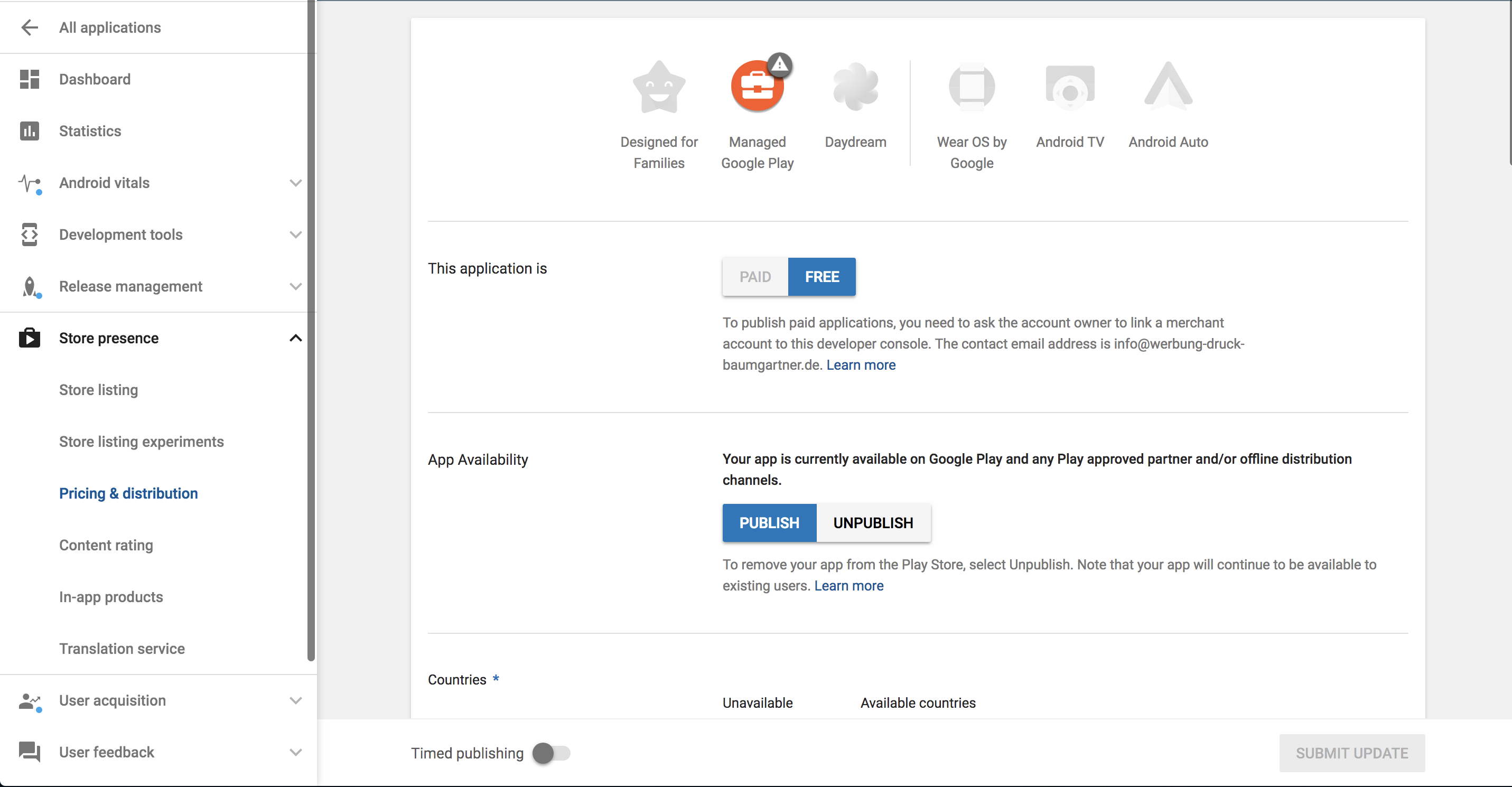
To unpublish an app in the Google Play Store

Tip
The app will be removed from the Google Play Store within a day. Users who have already installed the app on their smartphone can of course continue to use it.

1637    App Store  

Related Knowledge Base Posts -

  • Google Developer Account
  • Confirm ownership of the Individual Developer Account for my customers
  • When is a resubmission to the app stores necessary?
  • Facebook
  • Twitter
  • Tumblr
  • Pinterest
  • Google+
  • LinkedIn
  • E-Mail

About The Author

Leave a reply Cancel reply

You must be logged in to post a comment.

Recent Posts

  • Selling apps: this is how you succeed as a reseller
  • Do my customers need an app?
  • Marketing tools: how to use them as an app reseller with promising results!
  • The new AppYourself brings great changes for your customers apps
  • Information on future App submissions to the Apple App Store

Recent Comments

    Archives

    • August 2021
    • November 2019
    • December 2018
    • May 2018
    • February 2018
    • January 2018
    • December 2017
    • November 2017
    • October 2017

    Categories

    • AppYourself
    • News
    • Product
    • Uncategorized

    Meta

    • Log in
    • Entries feed
    • Comments feed
    • WordPress.org
    2015 Theme - WordPress Theme built by Mintithemes using WordPress.
    • Search Knowledgebase